Model the frame
Place beams, columns and braces using steel profiles. Work with grids, snapping and member properties.
 staxisSTEEL MODELLING FOR MAC
Staxis is a focused modelling workspace for small steelwork firms. Work with sections, connections and drawing views in the context of the whole model.
Get launch updates →Preparing for the Mac App Store. Not available to buy or trial today.
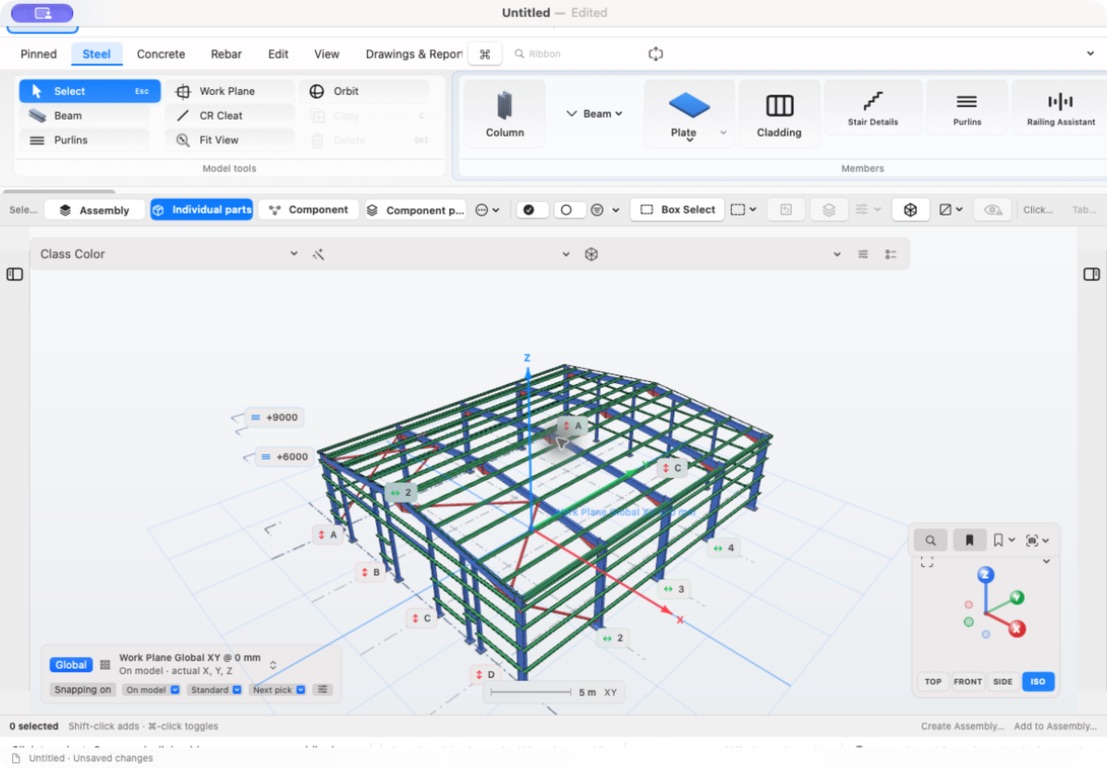
Place beams, columns and braces using steel profiles. Work with grids, snapping and member properties.
Work with baseplates, end plates, fin plates, bolts and welds in three dimensions.
Create general arrangement and assembly drawing views with dimensions, marks and schedules for review.
Project files stay in a location you choose. Simultaneous multi-user editing is not included. Final macOS and hardware requirements will be published with the App Store listing; an iPad product is not included in the Mac launch offer.
Models, connections, dimensions and outputs require checking by a suitably qualified person before fabrication, erection or construction. Staxis does not replace engineering design or approval.
Evaluate section-aware modelling, connections, drawing outputs and file ownership against the way your workshop works.
Read the guide →Follow the information from the overall frame to an assembly drawing, with checks before handing work to fabrication.
Read the guide →A visual review checklist for connection geometry, orientation and interfaces, without substituting modelling for engineering design.
Read the guide →Plan local project storage, backups and a clear editing handover when evaluating a Mac steel modelling workflow.
Read the guide →